MINISFORUM UM870 Slim review: a 96GB-ready mini PC for local LLMs
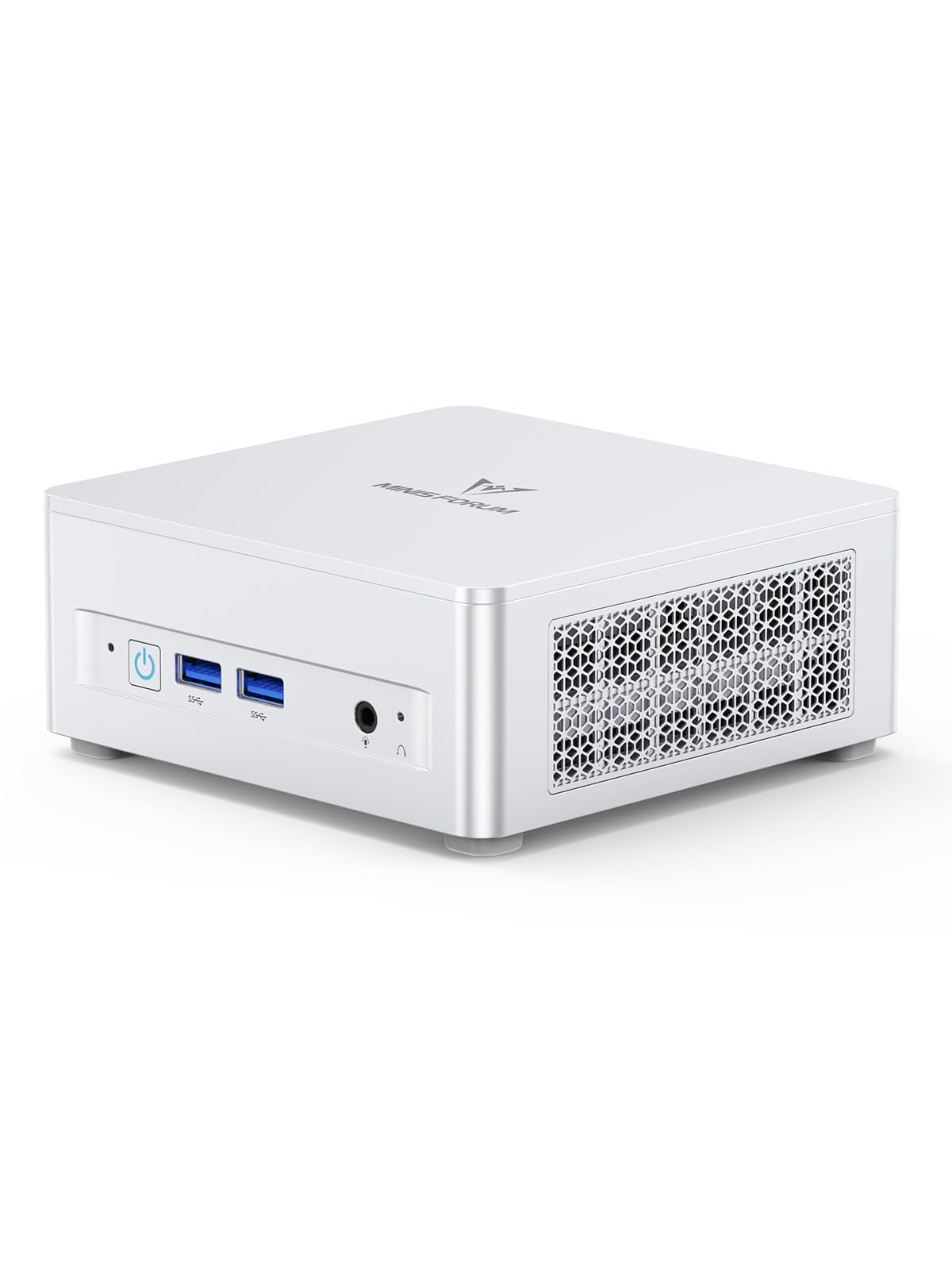

Ryzen 7 8745H with a 96GB RAM ceiling for mid-size local models
- Max Memory
- 96 GB
- Memory Bandwidth
- 89.6 GB/s
- GPU/NPU
- 8 TFLOPS
- 96GB RAM ceiling fits bigger models
- 32GB stock handles mid-size quantized models
- Dual-channel SO-DIMM caps token speed
The UM870 Slim's two SO-DIMM slots accept up to 96GB of DDR5, enough to load quantized models that a 32GB laptop can't open. Generation speed is a different matter, because memory bandwidth, not capacity, sets how many tok/s you get from a Radeon 780M iGPU.
Design and build quality
The UM870 Slim follows MINISFORUM's slim mini PC format: a low, flat chassis meant to sit beside a keyboard or mount out of sight. The more important part for local LLM work is inside. Here the slimness costs less than it usually does, because the main components stay user-replaceable rather than soldered.
Inside the chassis: socketed RAM, two SSD slots
Many thin machines, including most unified-memory laptops and some Ryzen AI Max designs, solder their memory to the board. That fixes your model ceiling on the day you buy. The UM870 Slim instead uses 2x DDR5 SO-DIMM slots and 2x M.2 2280 PCIe 4.0 slots. Both are standard parts you can buy from any vendor.
| Component | As shipped | Upgrade ceiling | Why it matters for local LLMs |
|---|---|---|---|
| Memory | 32GB DDR5 across 2x SO-DIMM | 96GB | Decides which quantized models fit at all |
| Storage | 1TB M.2 2280 PCIe 4.0 | Up to 4TB (2x 2TB) | Model libraries grow quickly; a 70B Q4 file alone takes tens of GB |
| SSD slots | 1 of 2 populated | Second slot free | Add capacity without cloning or reinstalling the OS |
There are two practical points for buyers:
- Adding storage is easy. One M.2 slot ships empty, so a second drive just goes in next to the first. That makes it simple to keep a separate drive for Ollama or LM Studio model files, away from the OS.
- Adding memory means replacing both modules. Both SO-DIMM slots are filled with the stock 32GB. Reaching 96GB means swapping in a new matched pair, not adding a stick, and the original modules become spares. A matched pair also keeps the board in dual-channel mode, which matters for token speed (see the performance section).
Socketed DDR5 lets you buy the $889 configuration now, run 7B–14B models on 32GB, and move to 96GB later if you want 70B-class models. A soldered-memory mini PC forces you to choose your RAM capacity at checkout.
Power: barrel jack or one USB4 cable
The UM870 Slim takes power in two ways. One is a conventional 19V DC barrel input. The other is 65–100W USB Power Delivery input over the USB4 port. With a monitor or dock that supplies enough PD wattage, a single USB4 cable can carry power, display and data, so the bundled power brick can stay in a drawer.
This suits a VESA-mounted setup behind a monitor, where a second cable to the wall makes cable routing harder. Check the wattage before you plan around it. A dock or monitor at the bottom of the 65–100W range may be enough for desktop work but leave less headroom when the APU is under full inference load. If you run long generation jobs, the barrel jack is the safer default.
What a 65W chip in a thin case means for noise
The Ryzen 7 8745H can run at up to 65W in performance mode. That is a lot of heat for a slim chassis, and the cooler has to remove it actively. Short bursts like web browsing, coding or a quick chat response finish before the fans need to work hard. Sustained inference is different: long prompt processing, batch summarization or a 32B model producing hundreds of tokens all keep the CPU and iGPU loaded for minutes. Expect audible fan noise during those jobs.
Placement affects how much this bothers you:
- On the desk, the machine sits close to your ears. If you run long jobs often, lowering the power mode will usually make it quieter, though tokens will come out somewhat slower.
- Behind a monitor, the panel blocks some of the noise. Leave space around the intake and exhaust vents, because a slim chassis pressed against a wall or monitor back can restrict airflow.
- In a home lab, as an always-on Ollama endpoint on a shelf or in another room, the noise largely stops mattering.
Overall, the build favors flexibility over silence. You get standard, replaceable memory and storage, plus single-cable power if your monitor or dock supports it. In return, the case makes noise when you push the APU, which is its trade-off against the large, slower-revving coolers of bigger desktop towers.
| Max Memory | 96 GB |
|---|---|
| Memory Bandwidth | 89.6 GB/s |
| GPU/NPU | 8 TFLOPS |
Expected performance for local LLMs
For local LLM work, the Radeon 780M iGPU matters less than the memory bus that feeds it. That bus decides how fast tokens appear once a model is loaded.
What the 780M brings to inference
The 780M has 12 RDNA3 compute units at 2600MHz, and MINISFORUM compares it to a GTX 1650. That comparison describes gaming-class graphics. For inference, the more important difference is memory. A GTX 1650 has only 4GB of VRAM. The 780M has no VRAM at all. It uses unified memory, which lets it address a large share of system RAM. That is why this mini PC can load a 32B model that would never fit on an entry-level discrete card.
In llama.cpp-based tools, the 780M runs through two backends:
- Vulkan is the easy route. LM Studio and llama.cpp builds support it with no driver workarounds.
- ROCm can be faster in some workloads. The 780M isn't on AMD's official ROCm support list, though, so it usually needs a GFX version override to work.
Ollama users should check which backend their build actually uses. Some fall back to the CPU on this iGPU, which noticeably cuts generation speed.
Range across the products compared here
Why bandwidth sets the speed limit
Generating each token means streaming roughly the whole quantized model through memory. As a rule of thumb, tok/s is capped by memory bandwidth divided by model size.
- This machine: two DDR5 SO-DIMMs on a 128-bit bus, which works out to a theoretical figure under 100 GB/s. Real-world throughput is lower.
- Strix Halo / Ryzen AI Max designs: a 256-bit LPDDR5X bus with roughly 2.5–3× that bandwidth, which is the main reason they generate large models so much faster.
Adding RAM doesn't change this. A 96GB upgrade widens which models fit, not how fast they run.
| Model class (Q4 quantization) | Approx. weight size | Bandwidth-based ceiling on this platform | Practical fit |
|---|---|---|---|
| 7B–8B | ~4–5 GB | Roughly high-teens tok/s at best | Responsive chat and coding help |
| 13B–14B | ~8–9 GB | Roughly 8–10 tok/s at best | Usable for chat, slower but workable |
| 32B | ~18–20 GB | Low single digits | Batch jobs, drafting, patient use |
| 70B | ~40 GB | Around 2 tok/s or less | Overnight or "fire and check later" work only |
These figures are arithmetic upper bounds derived from bus width, not measured results. Real throughput typically lands below them.
Reading your prompt (prefill) depends on compute, not bandwidth, and 12 CUs is modest. Long context windows hurt twice. First, a 16K–32K-token prompt can take tens of seconds or more to process before the first token appears on a 14B model, and longer on 32B. Second, the KV cache grows with context and eats into the RAM left for the model. For RAG over long documents, keep the context trimmed or expect waits.
What that feels like day to day
7B–8B models at Q4 feel responsive. Llama 3.1 8B, Qwen-class coders and Mistral 7B stream text faster than most people read, which suits an Ollama-backed coding assistant or a quick chat window.
14B is the sweet spot for quality versus patience on this hardware: at roughly 8–10 tok/s at best, it answers noticeably better than an 8B model while still keeping pace with chat.
32B and larger are usable only for batch-style or patient work. That means summarizing a folder of notes, generating drafts while you do something else, or running evaluation scripts. Interactive back-and-forth at a few tokens per second gets tedious fast.
Mixture-of-experts models are a partial escape. Only a fraction of their parameters activate per token, so a large MoE at Q4 can generate noticeably faster than a dense model of the same file size. You still pay the full RAM cost to load it, which is where the extra SO-DIMM capacity earns its keep.
Bottom line: if your goal is fast 70B-class inference, the dual-channel bus rules this machine out regardless of how much RAM you install. If you want snappy 7B–14B models alongside a capable desktop, the 780M and unified memory deliver that comfortably.
Ports, displays and daily handling
For a chassis this thin, the UM870 Slim has a complete desktop I/O loadout. Most of what you'd plug into a workstation fits without a dock. The one constraint is that a single port, the USB4, does several important jobs, and you can only use it for one of them at a time.
| Port | Count | What it's good for |
|---|---|---|
| USB4 (40Gbps, Alt mode, PD input) | 1 | 8K@60Hz display, fast external SSD, eGPU, or 65–100W single-cable power |
| HDMI 2.1 | 1 | 8K@60Hz display or a high-refresh TV |
| DisplayPort 1.4 | 1 | 4K@120Hz monitor |
| USB 3.2 Gen2 Type-A (10Gbps) | 2 | External drives, capture devices, fast flash storage |
| USB 2.0 | 2 | Keyboard, mouse, receivers |
| 2.5Gbps Ethernet | 1 | NAS access, serving models on the LAN |
| 3.5mm audio | 1 | Headset or speakers |
| DC 19V input | 1 | Standard barrel power |
Three independent displays
HDMI 2.1 (8K@60Hz), USB4 (8K@60Hz) and DisplayPort 1.4 (4K@120Hz) can drive three independent screens at once. A typical arrangement puts a 4K editor on one, a terminal or LM Studio chat window on the second, and documentation or a browser on the third.
The Radeon 780M handles that load for desktop work. Two caveats apply:
- Displays draw on the same memory. Every high-resolution framebuffer and every GPU-accelerated app uses the same dual-channel DDR5 that the iGPU relies on for inference. Running three 4K panels while generating tokens takes a small but real share of that pool.
- The third screen depends on USB4. It needs a USB-C or USB4 monitor, or an adapter. If you later commit the USB4 port to an eGPU, you're down to two native outputs.
Networking: 2.5GbE matters more than it sounds
2.5Gbps LAN is the most useful port here for local LLM work. Model files are large. A 70B model at Q4 is roughly a 40GB download. Pulling that from a NAS over 2.5GbE takes about a third as long as over gigabit, assuming your switch and NAS also support 2.5GbE.
The same link helps when the UM870 runs Ollama as a headless inference box for other machines on your network. In that role, wired latency and throughput beat Wi-Fi.
Wi-Fi 6E and Bluetooth 5.3 cover setups without a cable run and handle wireless peripherals. Wi-Fi 6E's 6GHz band is useful in crowded apartment buildings if your router supports it.
The remaining ports are simple:
- Two 10Gbps USB-A ports for external SSDs, which is enough to keep a model library off the internal drives.
- Two USB 2.0 ports for keyboard and mouse receivers.
- A 3.5mm jack for a headset.
Pro tip
Plan around the single USB4 port before you buy. It can carry an 8K display, a fast external drive, an eGPU, or your 65–100W USB-C PD power, but not all of those at once. If you expect to add an eGPU later, power the UM870 from the 19V barrel and run your monitors on HDMI and DisplayPort from day one, so nothing has to be rewired.
The eGPU route: the real upgrade path
The iGPU is soldered, and system RAM tops out at 96GB. That leaves an external GPU over USB4 as the only way to add dedicated VRAM and the much higher memory bandwidth that comes with it. There is no OCuLink port, so every eGPU connects through USB4.
USB4 tunnels PCIe with more protocol overhead than OCuLink's direct PCIe link. In practice, the cost depends on how much of the model fits on the card:
- The whole model fits in VRAM. A 14B model at Q4 on a 16GB card is a typical example. The link's overhead mostly affects how long the model takes to load. Once the weights are on the card, token generation runs at the card's own memory bandwidth, which is well above anything the 780M can reach from DDR5.
- The model is split between VRAM and system RAM. This happens when a 70B model doesn't fit on the card. Layers then have to move across the USB4 link, and that bottleneck reduces the speedup considerably.
So an eGPU suits buyers who want noticeably faster 14B–32B inference with models that fit inside the card. It is not a shortcut to fast 70B inference.
Factor in the full cost as well: an enclosure, a separate power supply and desk space. Together, these can push the setup past the price of a machine built around a larger iGPU.
How it compares to alternatives
| Product | Rating | Price | Buy |
|---|---|---|---|
 Apple Mac mini (M5 Pro) 307GB/s unified memory for running local LLMs from a five-inch desktop +307GB/s bandwidth: faster LLM token generation+GPU Neural Accelerators: quicker prompt processing -Fixed memory: choose LLM capacity upfront | $1,549.00 | Buy → | |
 Apple Mac Studio (M5 Max) Up to 128GB unified memory at 614GB/s for running large LLMs quietly on your desk +128GB unified memory fits large quantized LLMs+614GB/s bandwidth speeds token generation -128GB cap limits the largest models | $2,299.99 | Buy → | |
 AMD Ryzen AI Halo Editor's Choice 128GB unified memory to run up to 200B-parameter models locally on Linux +128GB shared pool: loads 200B models+Preloaded ROCm stack: less Linux setup -256 GB/s limits dense-model token speed | $4,760.00 | Buy → | |
| Apple Mac mini (M6) Best Value Up to 32GB unified memory and 170GB/s in a 5x5-inch box for quiet, always-on local LLMs +32GB unified memory fits ~30B quantized models+GPU Neural Accelerators speed prompt processing -170GB/s bandwidth limits tokens per second | $779.00 | Buy → | |
 GEEKOM A9 Max Ryzen AI 9 470 mini PC with room for 128 GB RAM to run larger local LLMs +128 GB RAM ceiling fits bigger models+2TB SSD stores many model files -Stock 32GB limits model size | $1,599.00 | Buy → | |
 MINISFORUM AI X1 Pro-370 128GB RAM ceiling and OCuLink for a GPU upgrade later +128GB RAM: fits 70B quantized models+OCuLink: add a desktop eGPU later -890M iGPU: slow tokens on large models | $1,247.00 | Buy → |
Prices as of Nov 12, 2026; they may have changed since.
Pros
- 96GB RAM ceiling fits bigger models
- 32GB stock handles mid-size quantized models
- USB4 40 Gbps for eGPU expansion
- 4TB across two M.2 for models
- 2.5GbE serves models to LAN clients
Cons
- Dual-channel SO-DIMM caps token speed
- 780M shares RAM, no dedicated VRAM
- Two USB 2.0 ports: slow peripherals
Who should buy the UM870 Slim
The UM870 Slim fits buyers who want a capable daily desktop first and a local LLM box second. Its strengths are 8 cores and 16 threads at up to 4.9GHz, three independent display outputs and room for 96GB of RAM. Its limits are dual-channel DDR5 bandwidth and a Radeon 780M iGPU that tops out at modest token speeds. Most of the buying decision comes down to which side of that trade-off your workload sits on.
Where it makes sense
Developers running 7B–14B models in Ollama for coding help are the core audience. A Q4-quantized 7B or 8B model fits easily inside the stock 32GB, and a 14B model at Q4 still leaves room for an IDE, a browser and Docker. For inline completions and short chat-style questions, a model that stays loaded and private on your own machine matters more than peak tok/s, and 7B–8B models at Q4 still stream faster than you can read. Going to 96GB mostly buys longer context windows and the option to keep several models resident, not speed.
Home-lab users who want a quiet-ish triple-monitor desktop get a lot of connectivity for $889:
- HDMI 2.1 at 8K@60Hz
- USB4 at 8K@60Hz
- DisplayPort 1.4 at 4K@120Hz
- 2.5Gbps LAN for a NAS or Proxmox node
- Two M.2 2280 PCIe 4.0 slots, so you can separate an OS drive from a model or VM library of up to 4TB
At light desktop loads the chip runs far below its 65W performance-mode ceiling. Expect audible fan noise during sustained inference or compiles, so "quiet-ish" is the honest description.
Tinkerers planning a USB4 eGPU have a workable upgrade path for 14B–32B models that fit entirely in the card's VRAM, as described in the eGPU section above.
Plan for the USB4 conflict covered above: with an eGPU attached, the machine itself drives two monitors over HDMI and DisplayPort, plus whatever you connect to the eGPU.
Who should skip it
Anyone who needs fast 70B inference. With 96GB installed, a 70B Q4 model will load, but generation is limited by dual-channel DDR5 memory bandwidth. Expect output slow enough to read along with, not interactive chat speed. If 70B-class models are your daily driver, the higher-bandwidth unified memory in Strix Halo / Ryzen AI Max mini PCs or Apple Silicon running MLX is where your money goes further.
Buyers who want NPU-accelerated Windows AI features. The Ryzen 7 8745H has no NPU, so Copilot+ features and other NPU-targeted apps won't run locally. Ollama, LM Studio and llama.cpp run on the CPU and iGPU instead, which is fine for LLMs but not a substitute for NPU workloads.
eGPU users chasing maximum bandwidth. If you plan to run a GPU permanently docked and split large models across it and system RAM, a mini PC with OCuLink is the better base than this USB4-only design.
Good for
- Developers running 7B–14B Q4 models in Ollama or LM Studio for coding assistance alongside an IDE
- Home-lab users who want three independent displays, 2.5Gbps LAN and two PCIe 4.0 M.2 slots in one desktop
- Tinkerers who plan to add a USB4 eGPU later and can accept losing the USB4 display output while it's connected
- Buyers who want 96GB of RAM headroom for long context windows or several resident models, and can live with modest tok/s
Not for
- Anyone who expects interactive speeds from 70B-class models
- Users who want Copilot+ or other NPU-accelerated Windows AI features, since the 8745H has no NPU
- eGPU builders who need OCuLink-level bandwidth for split-model inference
- LLM-only buyers who would get more tok/s per dollar from a higher-bandwidth Strix Halo or Apple Silicon machine
| Your main workload | Fit | Suggested setup |
|---|---|---|
| Coding assistant, 7B–8B Q4 | Strong | Stock 32GB / 1TB |
| General chat, 14B Q4 plus multitasking | Good | Stock 32GB, upgrade if you also run VMs |
| 32B models, long context windows | Workable but slow | 96GB upgrade |
| 70B daily use | Poor | Look at higher-bandwidth platforms |
| Office and triple-monitor desktop, LLMs on the side | Strong | Stock config |
Verdict
A well-connected, upgradeable Ryzen 7 8745H mini PC whose 96GB ceiling makes large quantized models possible, but whose dual-channel DDR5 keeps their token speeds modest.
At $889 the UM870 Slim delivers a full desktop: 32GB DDR5, a 1TB PCIe 4.0 SSD, USB4, 2.5Gbps LAN, Wi-Fi 6E and triple-display output. The 96GB RAM ceiling widens which models you can load, but it does not make the large ones fast.
Where the 96GB ceiling helps
The upgrade path is the main reason this machine belongs on a local LLM shortlist. With both SO-DIMM slots filled to 96GB, the Radeon 780M can address a large share of unified memory. That puts 32B models at Q4, and even 70B-class models at aggressive quantization, within reach of a single mini PC.
Capacity is solved; bandwidth is not. The same 128-bit DDR5 path that limits every iGPU of this class means a 70B model will load and answer at around 2 tok/s or less, which suits overnight batch jobs better than live chat.
How to buy it
The UM870 Slim is best bought as a general-purpose mini PC with local LLM headroom. It makes the most sense if it replaces a desktop tower, drives two or three monitors, and also runs a 7B–14B coding assistant in the background. In that case the $889 price is paying for the whole package rather than for inference alone.
One cost is easy to miss when planning that 96GB future: because both factory SO-DIMMs are already populated, budget for a full 2x48GB kit on top of the $889 purchase price, not a single extra stick.
Who should look elsewhere
If inference is the only reason you are buying, budget for a Strix Halo / Ryzen AI Max mini PC instead. Those machines cost more, but their 256-bit memory bus and much larger iGPU address the exact limit the UM870 Slim runs into with 32B and 70B models.
Apple Silicon with MLX is the other bandwidth-first route, if macOS fits your workflow. Going the other way, cheaper Ryzen mini PCs with the same Radeon 780M and dual-channel memory will deliver similar tok/s. That means the UM870 Slim's premium has to be justified by its USB4 PD input, 2.5GbE, dual PCIe 4.0 slots and 96GB support, not by faster generation.
Bottom line
Buy the UM870 Slim if you want one well-equipped desktop that drives three displays, runs 7B–14B models comfortably today and can grow to 96GB for larger quantized models later. Accept some fan noise under sustained inference. If your priority is fast 70B-class tok/s, the money is better spent on a Strix Halo machine.