Apple Mac mini (M5 Pro) review: a 307GB/s local LLM box for $1,549
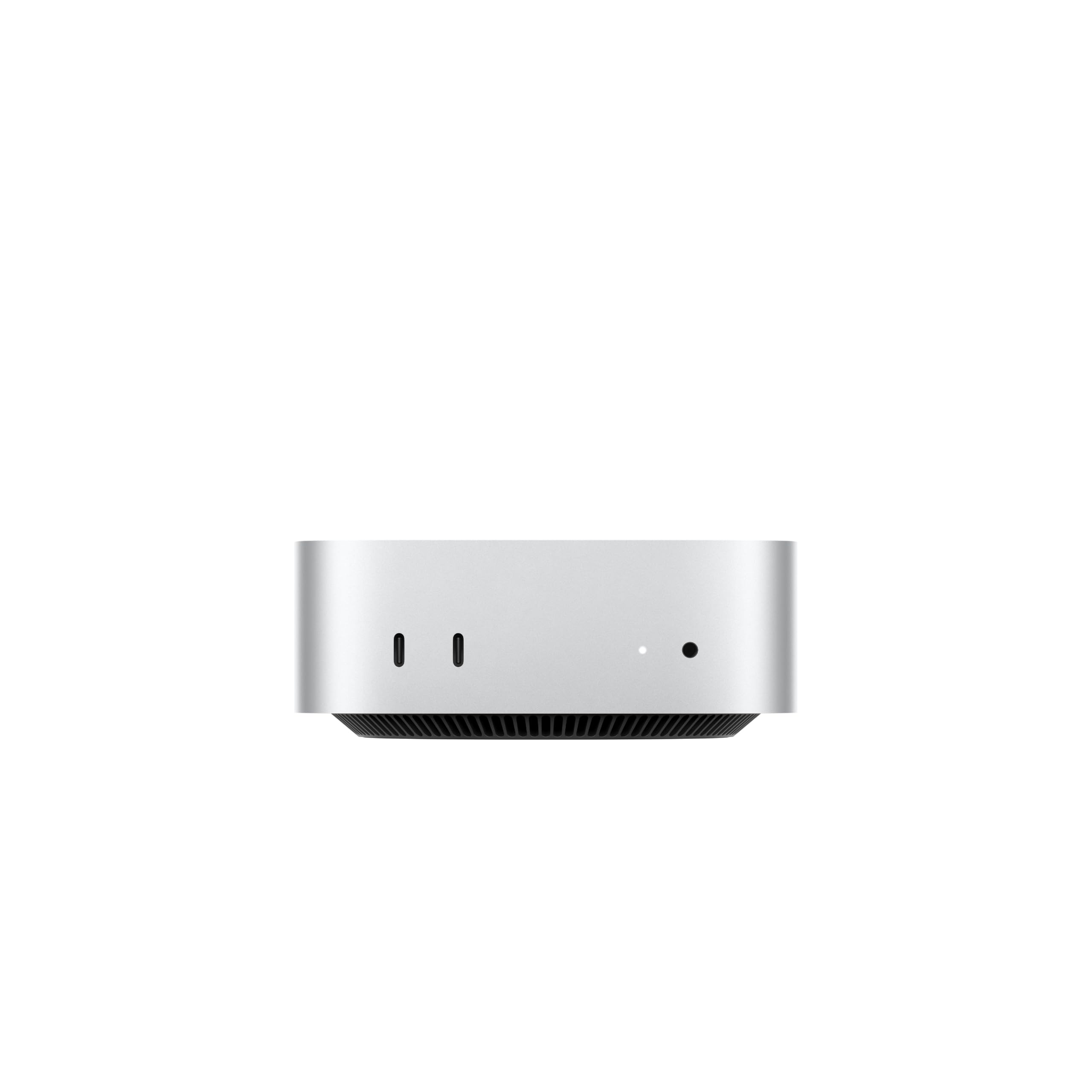

307GB/s unified memory for running local LLMs from a five-inch desktop
- Max Memory
- 64 GB
- Memory Bandwidth
- 307 GB/s
- GPU/NPU
- 20 cores
- 307GB/s bandwidth: faster LLM token generation
- GPU Neural Accelerators: quicker prompt processing
- Fixed memory: choose LLM capacity upfront
The number that decides how fast this Mac mini generates text is 307GB/s, the M5 Pro's unified memory bandwidth, and it fits in a five-by-five-inch chassis that sits under a monitor. Here's what that buys you at $1,549, where it beats Strix Halo mini PCs, and where it falls short.
| Max Memory | 64 GB |
|---|---|
| Memory Bandwidth | 307 GB/s |
| GPU/NPU | 20 cores |
Design and footprint
The M5 Pro Mac mini's main physical advantage is its five-by-five-inch footprint. That's small enough to sit under a monitor stand, behind a laptop riser, or on a shelf beside a router. Most Strix Halo / Ryzen AI Max mini PCs are noticeably larger, partly because they cool a large iGPU in a Windows or Linux chassis. With the Mac mini, a local LLM box doesn't take over your desk. It fits into whatever setup you already have.
Placement depends on how you'll use it. On a desk, the obvious spot is directly under a display, which keeps the front ports within arm's reach. As a headless inference node for Ollama or LM Studio over the network, it fits on a bookshelf, a media cabinet or a rack shelf next to a NAS. Because it's so small, you can treat it as infrastructure rather than furniture. Apple doesn't sell a rack-mount version, though, so a rack install means a third-party shelf or tray. Leave space around it for airflow rather than packing it tightly between other gear.
Port layout: rear for permanent cables, front for quick connections
Apple splits the I/O by how often you'll touch it, and the split is practical:
| Location | Ports | Typical use |
|---|---|---|
| Rear | 3× Thunderbolt 5 | External SSDs for model weights and media, docks, displays |
| Rear | HDMI | Primary or secondary monitor, TV, capture setup |
| Rear | 2.5Gb Ethernet | Wired LAN for headless serving, NAS access, remote clients |
| Front | 2× USB-C | Card readers, phones, flash drives, short-term peripherals |
| Front | Headphone jack | Wired headphones or monitoring |
The rear is the permanent-cable side. Display cables, Ethernet and a Thunderbolt 5 SSD holding your model library get plugged in once and left alone. With three Thunderbolt 5 ports back there, you can attach a fast external drive and a dock and still have a port free, without daisy-chaining everything through one hub.
The front is for quick connections. The two front USB-C ports and the headphone jack cover what you plug in and out every day: a USB-C card reader for camera footage, a phone, a flash drive with a dataset, or headphones for a call. This matters more on a 5×5 chassis than on a tower: a box this small and light can shift when you reach behind it for a port, and front access avoids that.
If the Mac mini sits under a monitor with its back to the wall, every rear port is effectively a set-and-forget connection. Decide up front which external drive holds your model weights and which display uses HDMI versus Thunderbolt, then route those cables once. Leave the front USB-C ports free for the devices you swap in and out.
What the small chassis means for you
The compact design has trade-offs. There's no internal expansion: no drive bays, no PCIe slot, no user-upgradeable RAM, and no OCuLink for an eGPU. All expansion goes through Thunderbolt 5 and USB-C. For storage that works well, because an external Thunderbolt 5 SSD is a reasonable home for a large model library or ProRes RAW projects. For memory there's no workaround. The unified memory you pick at checkout is what you'll have for the life of the machine, and that limits which models you can run long after you've forgotten the chip name.
Who the design suits. If you want a machine that disappears under a monitor or runs local LLMs and agents overnight on a shelf, the chassis is a real reason to choose it. If you'd rather build in expandability, with more internal storage, a slot-in GPU or RAM you can upgrade later, the five-by-five-inch size is the reason it can't offer those things.
Performance for local LLMs and media
For a local LLM, generation speed tracks memory bandwidth, not core count or TOPS. Generating each token means streaming the model's active weights out of memory, so the M5 Pro's 307GB/s sets a hard ceiling on tokens per second (tok/s). The Neural Accelerators in each GPU core mostly speed up prompt processing, the "thinking" pause before the first token, which matters most when you paste in long documents or codebases.
Range across the products compared here
Against other machines in our catalog, 307GB/s places the M5 Pro Mac mini in the middle of the compact-desktop field. It is well above conventional dual-channel mini PCs, which feel sluggish on anything past small models. It is not the top of the class, though, and the bars above show which rivals sit higher. For chat and coding assistants, that bandwidth is comfortable on mid-size models. Large dense models are usable but not quick.
Q4 vs Q8: what 307GB/s buys you
A useful rule of thumb is that the speed ceiling equals bandwidth divided by the bytes read per token. The figures below are theoretical upper bounds derived from that math, not measurements. Real-world tok/s lands noticeably lower once overheads and runtime efficiency come into play.
| Model (dense) | Approx. weight size | Ceiling at 307GB/s |
|---|---|---|
| 8B at Q4 | ~4.5GB | ~68 tok/s |
| 8B at Q8 | ~8.5GB | ~36 tok/s |
| 32B at Q4 | ~18GB | ~17 tok/s |
| 32B at Q8 | ~34GB | ~9 tok/s |
| 70B at Q4 | ~40GB | ~7–8 tok/s |
| 70B at Q8 | ~75GB | ~4 tok/s |
Two practical conclusions follow from the table:
- Q4 is the default on this machine. Moving to Q8 roughly halves generation speed for a quality gain that is often hard to notice in everyday chat. Q8 is worth it for small models or for precision-sensitive work such as code and structured extraction.
- Mixture-of-experts models suit this bandwidth best. They only read their active parameters per token, so a large MoE model can generate far faster than a dense model of the same total size, provided the full weights fit in memory.
Your memory configuration, not the chip, sets the limit
The chip sets the speed. The unified memory you buy at checkout decides which models load at all. The full set of weights has to sit in unified memory alongside three other loads:
- macOS and your open apps
- the default cap on how much memory the GPU can claim, which can be adjusted
- the KV cache, which grows with the context window
A 70B model at Q4 needs roughly 40GB for weights alone. A long context can add many more gigabytes on top of that. A smaller configuration therefore limits you twice, with smaller models and shorter usable context. Unified memory can't be upgraded later, so size it for the largest model and context you expect to run, plus headroom.
Estimate memory as 0.5–0.6GB per billion parameters at Q4, or about 1GB per billion at Q8. Then add 25–35% for macOS, apps and the context window. If the total sits near your configuration's limit, drop a quantization level or step down a model size.
Storage and media: where "up to 2x faster" pays off
Apple cites up to 2x faster storage. For LLM work, that mostly means shorter load times when you swap between multi-gigabyte model files, which you will do often while comparing models in LM Studio or Ollama. It helps the same way with custom research datasets that are too large to keep cached. For video editors, faster storage keeps ProRes RAW footage scrubbing smoothly from the internal drive. It also leaves less reason to offload active projects to an external Thunderbolt 5 drive.
Software runs natively
The main local LLM tools are built for Apple silicon:
- MLX is Apple's own framework.
- llama.cpp uses Metal directly.
- Ollama and LM Studio are built on those backends.
There's no CUDA toolkit or GPU driver to manage. GPU acceleration, including the Neural Accelerators where a framework supports them, comes through macOS and app updates. MLX generally gets new Apple silicon features first. If you want maximum tok/s on this hardware, LM Studio's MLX engine or MLX itself is usually the place to start, and Ollama is the simplest choice for scripted agents running overnight.
Software, connectivity and the Apple ecosystem
macOS, the port layout and Apple's wireless silicon decide whether the M5 Pro Mac mini works as a desk-side workstation, a headless model server, or both.
Displays, Thunderbolt 5 and the wired backbone
The Mac mini supports up to three external displays. A video editor can run a timeline, a viewer and a scopes or reference screen at the same time. A developer can keep an editor, a terminal running Ollama logs and a browser-based chat front end each on its own panel. HDMI covers one screen directly, and the three rear Thunderbolt 5 ports handle the rest.
Thunderbolt 5 also raises the limit for fast external storage and docks. Model libraries grow quickly: a few Q4 and Q8 variants of 30B–70B-class models can fill hundreds of gigabytes. Keeping that archive on a fast external NVMe enclosure lets you leave the internal drive for active work. You can swap weights in without the slow load times that USB-era drives impose. A single Thunderbolt dock can also turn the rear ports into a full desk hub. The two front USB-C ports then stay free for card readers and phones.
For server use, the 2.5Gb Ethernet port matters most. A headless Mac mini running Ollama, LM Studio's server mode or a llama.cpp endpoint can sit in a cupboard or rack and answer requests from every laptop on a home or office network. Over 2.5Gb, moving model files and datasets between machines takes noticeably less time than over gigabit. Wired Ethernet also gives a more consistent connection for overnight agent jobs than Wi-Fi.
Wireless and the Apple-ecosystem tie-ins
Wireless comes from the Apple-designed N1 chip, which provides Wi-Fi 7 and Bluetooth 6. Wi-Fi 7 only pays off with a Wi-Fi 7 router. With one, you can place the mini wherever is convenient rather than near a network jack. For a dedicated LLM server, Ethernet is still the better choice.
On the software side, macOS window tiling makes a three-display layout manageable without third-party utilities. Sidecar turns an iPad into an extra display or a pen-input surface. iPhone Mirroring lets you use iPhone apps from the Mac desktop. Universal Clipboard lets you copy a prompt, an error message or a code snippet on iPhone and paste it straight into a Mac terminal.
Apple also states that teams can connect with on-device agents from their iPhone. In practice, a long-running agent or an overnight data-analysis job keeps running on the mini while people check results or send new tasks from their phones. The data stays on hardware you control rather than going to a cloud API. A Strix Halo mini PC running Linux can do the same with self-hosted tooling, but you build and maintain that plumbing yourself. On the Mac, much of it comes built into the platform.
The caveat to act on before you order
Every connectivity option above expands storage, displays or networking, but none of them adds memory. There is no SO-DIMM slot and no OCuLink eGPU route to extra VRAM, so the unified memory you choose at checkout stays the hard limit on model size and context window.
Size it for the model you plan to run next year, not the one you run today. Quantization helps, since Q4 needs roughly half the memory of Q8, but the KV cache from long context windows sits on top of the weights, and that is the part buyers tend to underestimate.
Pro tip
Before you configure, write down three numbers: the largest model you expect to run in parameters (for example 70B), the quantization you'll accept (Q4 or Q8), and the context window your agents or documents need. Run them through the sizing shortcut above. If the total falls between two memory tiers, choose the larger one. Storage can be added later over Thunderbolt 5; unified memory cannot.
How it compares with Strix Halo mini PCs and other options
| Product | Rating | Price | Buy |
|---|---|---|---|
 Apple Mac mini (M5 Pro) 307GB/s unified memory for running local LLMs from a five-inch desktop +307GB/s bandwidth: faster LLM token generation+GPU Neural Accelerators: quicker prompt processing -Fixed memory: choose LLM capacity upfront | $1,549.00 | Buy → | |
 Apple Mac Studio (M5 Max) Up to 128GB unified memory at 614GB/s for running large LLMs quietly on your desk +128GB unified memory fits large quantized LLMs+614GB/s bandwidth speeds token generation -128GB cap limits the largest models | $2,299.99 | Buy → | |
 AMD Ryzen AI Halo Editor's Choice 128GB unified memory to run up to 200B-parameter models locally on Linux +128GB shared pool: loads 200B models+Preloaded ROCm stack: less Linux setup -256 GB/s limits dense-model token speed | $4,760.00 | Buy → | |
| Apple Mac mini (M6) Best Value Up to 32GB unified memory and 170GB/s in a 5x5-inch box for quiet, always-on local LLMs +32GB unified memory fits ~30B quantized models+GPU Neural Accelerators speed prompt processing -170GB/s bandwidth limits tokens per second | $779.00 | Buy → | |
 GEEKOM A9 Max Ryzen AI 9 470 mini PC with room for 128 GB RAM to run larger local LLMs +128 GB RAM ceiling fits bigger models+2TB SSD stores many model files -Stock 32GB limits model size | $1,599.00 | Buy → | |
 MINISFORUM AI X1 Pro-370 128GB RAM ceiling and OCuLink for a GPU upgrade later +128GB RAM: fits 70B quantized models+OCuLink: add a desktop eGPU later -890M iGPU: slow tokens on large models | $1,247.00 | Buy → |
Prices as of Nov 12, 2026; they may have changed since.
Who should buy it and who should skip it
The M5 Pro Mac mini rewards buyers who know what they'll run on it. Here's how its bandwidth, storage and fixed memory play out for specific readers.
Good for
- Developers running local LLMs and agents in MLX, Ollama, LM Studio or llama.cpp, especially agents and overnight data-analysis jobs that run unattended on a desktop small enough to tuck under a monitor
- Video editors working in ProRes RAW, who benefit from the faster unified memory, up to 2x faster storage and three Thunderbolt 5 ports for fast external drives
- Researchers loading custom datasets into memory, where storage speed affects how long you wait before the first job starts
- iPhone-centric small teams that want a shared, always-on Mac they can reach from their phones, with iPhone Mirroring and Universal Clipboard built in
Not for
- Anyone whose toolchain needs CUDA, such as PyTorch training scripts, CUDA-only inference servers or vendor plugins
- Buyers planning an eGPU over OCuLink to add dedicated VRAM later
- Anyone who expects to upgrade RAM after purchase
- People whose work runs fine on the cheaper standard Mac mini
- Anyone aiming at 70B-class models at higher quantization who won't pay for the larger unified memory configurations
Where it fits
For local LLM developers, the appeal is a single pool of unified memory that both the GPU and CPU can address, in a five-by-five-inch box that can sit headless on 2.5Gb Ethernet. Model weights load into the same memory the GPU computes from, so a quantized model that fits in unified memory runs without being split across devices. That makes it a good fit for agent workflows Apple targets directly: a model serving requests all day or chewing through a dataset overnight. Generation speed scales with bandwidth divided by model size, so 7B–14B models at Q4 or Q8 are where the 307GB/s figure feels fast. Larger models still run, but more slowly.
For ProRes RAW editors and dataset-heavy researchers, the argument rests on Apple's storage and memory claims more than on AI features. Up to 2x faster storage shortens the wait to open large clips or load a multi-gigabyte dataset. The front USB-C ports make card readers and shuttle drives easy to reach, so you don't have to reach behind the machine for every offload.
Where it doesn't
The hard no is CUDA. If your work depends on NVIDIA-only libraries, MLX and Metal won't stand in for them, and no Mac mini configuration changes that. The same goes for upgrade paths. Some x86 mini PCs offer OCuLink, which lets you add an eGPU with its own VRAM later. The Mac mini has no OCuLink port, and its memory is fixed at purchase. You buy your ceiling on day one.
The 70B trap
A 70B model needs about 40GB at Q4 and roughly double that at Q8, before the KV cache and macOS overhead. Even when it fits, the bandwidth table caps it at around 7–8 tok/s at Q4 and about 4 tok/s at Q8. If 70B-class models at higher quantization are your goal and you won't pay for the larger memory configurations, this is the wrong machine.
| Your main workload | Memory priority | Fit |
|---|---|---|
| 7B–14B models, coding assistants, agents | Moderate | Strong |
| 30B-class models with long context windows | High | Good with a larger memory configuration |
| 70B-class models at Q8 | Very high | Only at the top memory configurations |
| CUDA training or inference | Not applicable | Skip |
| Office work, light photo editing, browsing | Low | The standard Mac mini is the better buy |
The last row matters more than it looks. If your heaviest job is a 7B chatbot now and then, or photo edits in Lightroom, the standard Mac mini covers it for less money. The M5 Pro's extra bandwidth and Thunderbolt 5 only pay off once memory throughput, fast storage or multiple displays actually limit your work.
Pros
- 307GB/s bandwidth: faster LLM token generation
- GPU Neural Accelerators: quicker prompt processing
- Five-inch box: compact always-on agent server
- Thunderbolt 5: fast external model drives
- 2.5Gb Ethernet: quicker model file transfers
Cons
- Fixed memory: choose LLM capacity upfront
- macOS only: CUDA-based tools won't run
- Max-tier chips decode large models faster
Verdict
Among compact machines in our catalog, the M5 Pro Mac mini is the strongest pick at $1,549 for macOS-based local LLM and pro media work. Choose your unified memory carefully, because that number caps which models you can run.
The M5 Pro Mac mini is a monitor-sized-footprint box built to stay on all day. It pairs 307GB/s of memory bandwidth with three Thunderbolt 5 ports, 2.5Gb Ethernet and Wi-Fi 7. Developers who run Ollama, LM Studio or MLX overnight get a headless agent host that teammates can reach from an iPhone. Video editors cutting ProRes RAW get faster storage and support for three external displays. Strix Halo / Ryzen AI Max mini PCs offer more memory headroom on Windows or Linux, but no compact machine we compared matches this one's footprint, ecosystem integration and polish for the money.
It is not the right box for everyone. If your workflow depends on CUDA, an OCuLink eGPU with dedicated VRAM, or RAM you can upgrade later, the platform will hold you back.
The one decision to get right: unified memory
The M5 Pro name tells you how fast the machine runs; the unified memory size tells you what fits. Here is how common workloads map onto configurations:
| Workload you plan to run | Approx. weight footprint | What it means for your configuration |
|---|---|---|
| 7B–8B model at Q4 | ~4–5GB | Fits comfortably. Bandwidth, not capacity, sets speed |
| 7B–8B model at Q8 | ~8–9GB | Still easy. Leaves room for long context windows |
| 30B-class model at Q4 | ~18–20GB | Needs real headroom once context and apps are added |
| 70B-class model at Q4 | ~40GB+ before context | Only on high-memory configurations. Expect modest tok/s |
| 70B-class model at Q8 | ~70GB+ | Plan for the largest configuration or skip this tier |
Bandwidth explains why size matters twice. Each generated token reads roughly the whole set of active weights, so 307GB/s divided by model size gives a theoretical tok/s ceiling. That is the gap between roughly 68 tok/s for an 8B Q4 model and 7–8 tok/s for a 70B Q4 model in the performance table above. More memory lets you load bigger models, but it doesn't make them run faster. Pick the size that matches your largest model plus the context window you actually use, then add margin for macOS and the apps you keep open.
Where the budget should go
If you're torn between more memory and more internal storage, choose memory. Thunderbolt 5 makes fast external SSDs a practical home for model libraries and media projects. A model that doesn't fit in unified memory can't be fixed later.
Who gets the most from it
- Local LLM developers and agent builders who want an always-on macOS host. MLX and Ollama are built for Apple silicon, and 2.5Gb Ethernet suits a headless setup.
- Video editors and researchers handling ProRes RAW or large datasets. They benefit from faster storage and up to three external displays.
- People already using Apple devices. iPhone Mirroring, Universal Clipboard and Sidecar add value that a Linux or Windows user wouldn't get.
Skip it if you need CUDA, an OCuLink eGPU or upgradeable RAM. Also skip it if you want 70B-class models at higher quantization but won't pay for the memory tier that runs them. In that case, a Strix Halo mini PC with more memory per dollar is the more honest fit.
Bottom line: If you work on macOS and value desk space, buy the M5 Pro Mac mini and size its unified memory for the biggest model you realistically plan to run.
Disclosure: we may earn a commission from qualifying purchases made through links on this page, at no extra cost to you.