Apple Mac mini (M6) review: a compact local LLM box with a 32GB ceiling
 Best Value
Up to 32GB unified memory and 170GB/s in a 5x5-inch box for quiet, always-on local LLMs
- Max Memory
- 32 GB
- Memory Bandwidth
- 170 GB/s
- GPU/NPU
- 10 cores
- 32GB unified memory fits ~30B quantized models
- GPU Neural Accelerators speed prompt processing
- 170GB/s bandwidth limits tokens per second
The number that decides whether the Mac mini (M6) fits your AI plans is 170GB/s. That memory bandwidth, paired with at most 32GB of unified memory, makes this five-by-five-inch desktop a capable home for quantized models up to roughly the 30B-parameter class. Anything larger needs different hardware.
Design and footprint
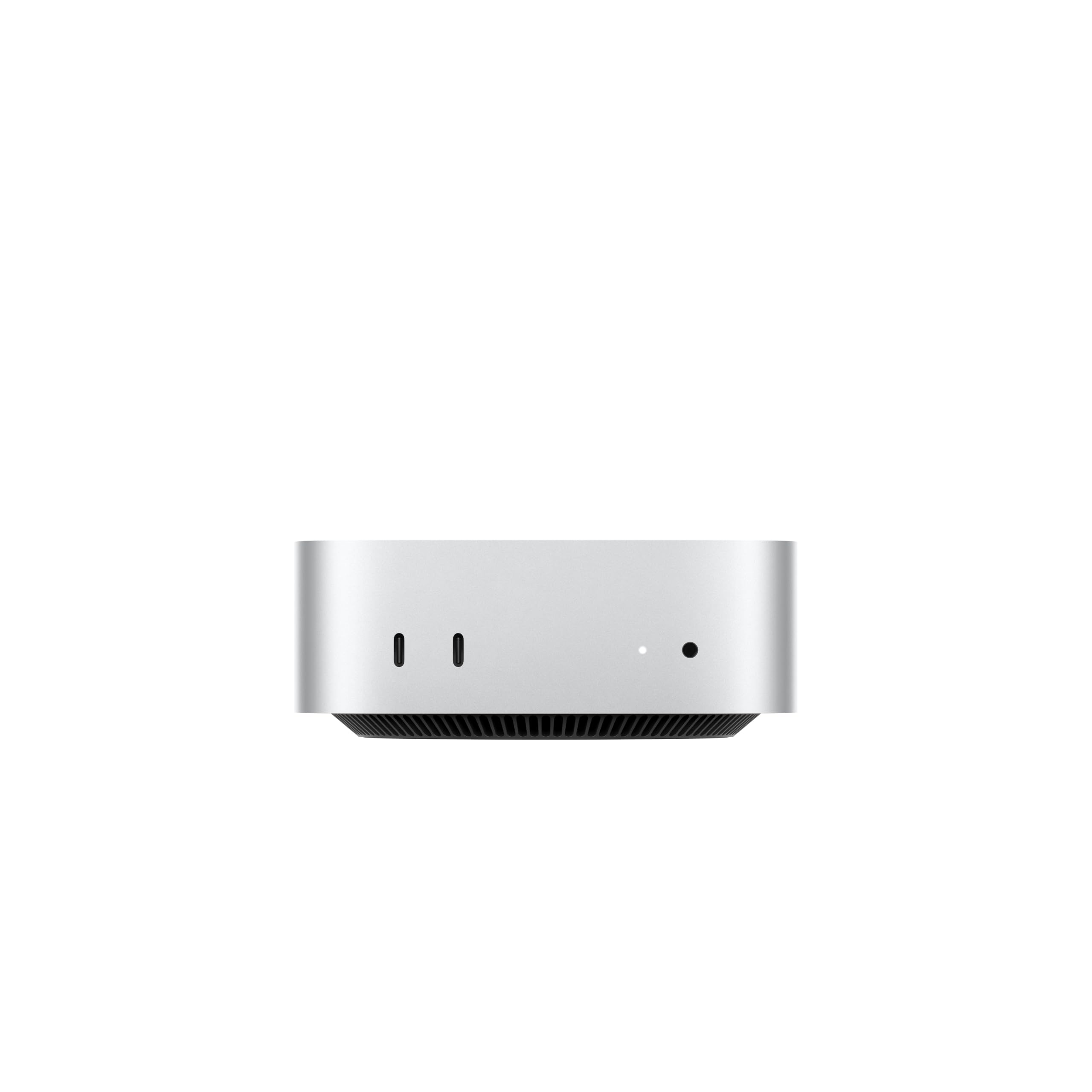
The headline design fact is the five-by-five-inch footprint. Apple calls the Mac mini "ultracompact," and at that size it fits under a monitor, on a shelf or in a closet where a tower would not. For a buyer choosing between it and a Windows or Linux mini PC, the footprint shapes where the machine can actually live.
A footprint that disappears under a monitor
Five inches square is small enough to sit under a raised monitor stand, on a narrow bookshelf, or behind a laptop riser without crowding the keyboard. Mini PCs built around large iGPUs, including the Strix Halo / Ryzen AI Max class covered later in this review, generally need bigger chassis to cool those chips, and some rely on external power bricks that need their own spot on the floor or a cable tray. If a clean desk matters, a single small square box is the tidier setup.
The trade-off is that the chassis was built to be small, not expandable. There is no room inside for added memory or a discrete GPU, which is why the 32GB unified memory ceiling discussed in the performance and value sections is permanent. The small size and the hard limit come from the same design decision.
Front and back ports split the cable clutter
Apple puts ports on both the front and the back. The permanent connections go on the rear: display cables, the Ethernet line and Thunderbolt docks or storage. They can be routed behind the desk and left alone. The front carries two USB-C ports and a headphone jack for things you plug in and pull out every day, such as a phone cable, a flash drive or headphones.
This matters most in the under-monitor setup. When a mini PC is tucked under a stand, rear-only ports mean pulling the machine out to plug in a USB stick. Front access fixes that without leaving every cable visible. The full port list and display support are covered in the connectivity section.
If the Mac mini will run agents or overnight AI data analyses on a shelf or in a closet, leave some open air around it rather than boxing it into a sealed cabinet. A small chassis has less surface area to shed heat, so free airflow helps it stay quiet during long inference runs.
Where it fits: desk, shelf or closet
Because the size suits both visible and hidden placements, the same machine can work as a primary desktop or as a headless agent server. Apple's own positioning, with agents running overnight and teams connecting to them from an iPhone, assumes you may never look at the box once it is set up.
| Placement | Why the 5×5-inch chassis suits it | What to plan for |
|---|---|---|
| Under a monitor stand | Fits beneath most raised stands and frees desk space | Front USB-C and headphone jack stay reachable |
| Bookshelf or side shelf | Small enough to sit beside books or a NAS | Run rear cables down behind the shelf |
| Home-office closet (headless) | Runs as an always-on local LLM or agent host | Wired 2.5Gb Ethernet and remote access instead of a monitor |
| Shared team closet or rack shelf | Several units fit where one tower would | Label units and keep airflow clear |
For a home office, the headless option is the most interesting. A small Mac running Ollama, LM Studio or an MLX-based server can sit next to the router, stay on around the clock, and serve models to laptops and phones on the network. That job otherwise tends to fall to a larger tower or a mini PC with a separate power brick.
Buyers who want to add memory or attach a GPU later should check the OCuLink-equipped alternatives in the comparison table before deciding on size alone.
| Max Memory | 32 GB |
|---|---|
| Memory Bandwidth | 170 GB/s |
| GPU/NPU | 10 cores |
Performance for local LLMs and AI workflows
For local LLM work, two numbers on the M6 Mac mini spec sheet decide most of the experience: 32GB of unified memory sets which models you can load, and 170GB/s of memory bandwidth sets how fast they answer once loaded. The CPU, the Neural Engine and Apple's "up to 4.8x" claim matter less than those two figures when you're watching tokens stream.
Why 170GB/s sets your tok/s
Generating each token requires the chip to read roughly the model's full set of active weights from memory. That makes memory bandwidth the main limit on generation speed. A practical rule of thumb is that bandwidth divided by the model's size in memory gives a theoretical ceiling for tokens per second (tok/s). Real-world results land below that ceiling once overhead and context are added.
Applied to 170GB/s, that rule gives these approximate ceilings for dense models. They are math, not measured results:
| Model (Q4 quantization) | Approx. weight size | Theoretical tok/s ceiling at 170GB/s |
|---|---|---|
| 7B–8B | ~4.5–5GB | ~35 tok/s |
| 14B | ~8–9GB | ~20 tok/s |
| 30B-class | ~17–19GB | ~9–10 tok/s |
| 70B | ~40GB+ | Doesn't fit in 32GB |
Chat feels fluid above roughly 10–15 tok/s. On this machine, 7B–14B models feel responsive, and dense 30B-class models are usable but slow, closer to reading pace. Mixture-of-experts models only read their active parameters for each token. That lets them generate much faster than their total size suggests, so they are often the best fit for this hardware.
What fits in 32GB
At Q4 quantization, models from roughly 7B to 30B parameters fit, and you still have room for a usable context window. That headroom matters because the KV cache grows with context length. macOS also needs its own share of the 32GB, so you can't give it all to the model.
- A 30B model at Q4 fits, but long context windows will push you toward the memory limit.
- Q8 versions of 7B–14B models fit comfortably and give better output quality at the cost of speed.
- 70B models do not fit at any practical quantization level. If 70B is on your roadmap, this machine can't run it, and no software update will change that.
Because the M6 tops out at 32GB and memory is fixed at purchase, local-LLM buyers should pick the 32GB configuration; anything less lowers the model-size ceiling for the life of the machine.
Range across the products compared here
The bars above show where the M6's memory and bandwidth figures sit among catalog rivals. The pattern to look for is the gap in memory capacity. Large-iGPU mini PCs built on AMD's Strix Halo / Ryzen AI Max chips offer much bigger memory pools, and that capacity is what makes 70B-class models possible. The Mac mini's case rests on what it does well within 32GB, not on matching those pools.
Reading Apple's "up to 4.8x faster AI" claim
Apple credits the 4.8x figure to three things: a Neural Accelerator in each GPU core, faster unified memory, and the Dual 16-core Neural Engine. The figure describes a peak scenario, not a guaranteed tok/s multiplier.
The per-core GPU accelerators mostly speed up compute-heavy stages. The biggest beneficiary is prompt processing, meaning how quickly the model reads a long document or codebase before it starts answering. Token generation stays tied to the 170GB/s bandwidth figure. In practice:
- Expect faster time-to-first-token on long prompts.
- Don't expect a large jump in steady streaming speed.
- The Neural Engine helps with Apple-optimized workloads and on-device features more than with typical llama.cpp inference.
Software support and model switching
You don't need to compile anything to get started. MLX, Ollama, LM Studio and llama.cpp all run natively on Apple silicon. Each one uses Metal GPU acceleration and treats the unified memory pool as one shared space, so there is no separate VRAM budget to manage. MLX is Apple's own framework and usually gets the most out of the hardware. Ollama and LM Studio are the easier choices for agents and local API endpoints.
Apple quotes up to 2x faster storage. That matters most when you switch models, because a 17–19GB 30B model has to be read from SSD into memory before it can answer. If your agent setup moves between a small, fast model for routing and a larger one for reasoning, faster loads shorten the wait at each switch. Storage speed has no effect on tok/s once a model is loaded.
The overall profile is a compact, always-on box that runs 7B–14B models at comfortable speeds and 30B-class models at a usable pace. For anything larger, the 32GB ceiling rules it out.
How it compares to the alternatives
| Product | Rating | Price | Buy |
|---|---|---|---|
 Apple Mac mini (M5 Pro) 307GB/s unified memory for running local LLMs from a five-inch desktop +307GB/s bandwidth: faster LLM token generation+GPU Neural Accelerators: quicker prompt processing -Fixed memory: choose LLM capacity upfront | $1,549.00 | Buy → | |
 Apple Mac Studio (M5 Max) Up to 128GB unified memory at 614GB/s for running large LLMs quietly on your desk +128GB unified memory fits large quantized LLMs+614GB/s bandwidth speeds token generation -128GB cap limits the largest models | $2,299.99 | Buy → | |
 AMD Ryzen AI Halo Editor's Choice 128GB unified memory to run up to 200B-parameter models locally on Linux +128GB shared pool: loads 200B models+Preloaded ROCm stack: less Linux setup -256 GB/s limits dense-model token speed | $4,760.00 | Buy → | |
| Apple Mac mini (M6) Best Value Up to 32GB unified memory and 170GB/s in a 5x5-inch box for quiet, always-on local LLMs +32GB unified memory fits ~30B quantized models+GPU Neural Accelerators speed prompt processing -170GB/s bandwidth limits tokens per second | $779.00 | Buy → | |
 GEEKOM A9 Max Ryzen AI 9 470 mini PC with room for 128 GB RAM to run larger local LLMs +128 GB RAM ceiling fits bigger models+2TB SSD stores many model files -Stock 32GB limits model size | $1,599.00 | Buy → | |
 MINISFORUM AI X1 Pro-370 128GB RAM ceiling and OCuLink for a GPU upgrade later +128GB RAM: fits 70B quantized models+OCuLink: add a desktop eGPU later -890M iGPU: slow tokens on large models | $1,247.00 | Buy → |
Prices as of Nov 12, 2026; they may have changed since.
Who should buy it, and who should skip it
The M6 Mac mini fits a specific kind of buyer. If your workloads stay within 32GB of unified memory and you value low-maintenance operation over expandability, it is a strong choice. It lists at $779 on Amazon, so confirm the memory configuration of the listing you buy matches the 32GB this review assumes. If your plans already exceed 32GB, look elsewhere.
Developers running agents overnight get the most out of it. The five-by-five-inch chassis, wired 2.5Gb Ethernet and macOS's low setup friction make it a natural always-on host for agent loops, scheduled AI data analyses and batch jobs that run while you sleep. These overnight workloads care more about reliability and staying on 24/7 than about peak tokens per second, so 170GB/s of memory bandwidth is rarely the bottleneck. Apple also positions the machine for teams reaching agents from their iPhone. If your workflow involves kicking off or checking a job from your phone, the Apple-to-Apple path takes less work to set up than on a Windows or Linux mini PC.
For local LLM experimenters, the realistic range is 7B to 30B parameters at Q4 quantization:
- A 7B–14B model leaves plenty of room for a long context window and the rest of macOS.
- A 30B-class model at Q4 still fits in 32GB, but it uses most of the available memory.
As the bandwidth table in the performance section shows, a 30B-class model generates at roughly reading pace: fine for agents and batch work, slow for interactive chat. Because the major runtimes all run natively, swapping between model sizes to find the right fit is straightforward.
The second group is Mac switchers who will use the Apple ecosystem daily:
- iPhone Mirroring lets you operate your phone from the Mac desktop.
- Cross-device copy and paste moves text and images between iPhone and Mac.
- Sidecar turns an iPad into a second display.
These features matter more to you if you already carry an iPhone and own an iPad. With support for up to three external displays and front-mounted USB-C ports, the Mac mini also works as a capable desk machine on days when you're not running models at all.
The reasons to skip it are just as concrete: 70B models, long context windows on large models, stacks built on CUDA-only tooling such as certain fine-tuning frameworks, research code or vendor SDKs, and any plan to add a GPU later. The verdict below explains where each one hits the 32GB ceiling.
Good for
- Developers hosting agents and scheduled AI data analyses on a compact machine that runs around the clock
- iPhone owners and teams who want to reach and manage agents from their phone
- Anyone experimenting with 7B–30B local LLMs in Ollama, LM Studio, llama.cpp or MLX
- Mac switchers who will use iPhone Mirroring, cross-device copy and paste and Sidecar every day
- Multi-monitor coding or trading desks that need up to three external displays from a small footprint
Not for
- Anyone planning to run 70B-class models, which is where Strix Halo / Ryzen AI Max mini PCs with larger memory pools fit better
- Users who need long context windows on 30B-plus models
- Workflows tied to CUDA-only libraries or NVIDIA tooling
- Buyers who want to add a discrete GPU with its own VRAM later through OCuLink or an eGPU
Pros
- 32GB unified memory fits ~30B quantized models
- GPU Neural Accelerators speed prompt processing
- 5x5-inch footprint for always-on agent hosting
- 2.5Gb Ethernet for fast LAN model serving
- Agents reachable from your iPhone
Cons
- 170GB/s bandwidth limits tokens per second
- 32GB cap rules out 70B models
- Thunderbolt 4 only, slower external model storage
Verdict
The M6 Mac mini is the easiest recommendation for running mid-size local LLMs, always-on agents and everyday Mac work from a five-by-five-inch box. Its 32GB unified memory ceiling and 170GB/s memory bandwidth also make it the wrong buy for anyone planning to run 70B models or add a GPU later.
At $779 on Amazon, the Mac mini (M6) is a compact, low-friction local LLM machine that stays out of the way. The deciding question is the one this review opened with: do your planned models fit under its 32GB memory and 170GB/s bandwidth limits?
Why it earns the recommendation
If your workload is 7B to 30B models at Q4 quantization, the M6 runs them on hardware that plugs in and works. Ollama, LM Studio, llama.cpp and MLX all run natively. You get three Thunderbolt 4 ports, HDMI and 2.5Gb Ethernet on the back, so the box can sit headless in a closet as an agent server. On a desk, it can drive up to three displays.
The bandwidth math from the performance section sets expectations: a theoretical ceiling in the mid-30s tok/s for an 8B model at Q4, which feels instant in chat, falling to around 9–10 tok/s for a 30B-class model. Real-world speeds land below those ceilings, which is why this machine is strongest with small-to-mid models running long, unattended jobs. Overnight AI data analyses, coding agents and document pipelines care about finishing, not about response speed. Apple's "up to 4.8x faster AI performance" claim pays off mainly in prompt processing, the wait before the first token appears; it does not raise the bandwidth ceiling on generation.
The rest of the package carries real weight too. iPhone Mirroring and cross-device copy and paste make it a capable everyday Mac. If you use an iPhone, you can reach your agents from it without extra setup.
Where the ceiling bites
Unified memory can't be upgraded, and the Mac mini has no path to an eGPU or OCuLink graphics card. The configuration you buy is the model-size limit you keep. That rules out three kinds of buyers:
- 70B-class models. A 70B model at Q4 needs roughly 40GB for weights alone. It won't fit in 32GB, even before macOS and the context window take their share.
- Long context windows on large models. The KV cache grows with context length, so a 30B model with a large context runs out of memory before you get near those limits.
- CUDA-only tooling or a GPU upgrade path. A Windows or Linux mini PC with OCuLink can add a discrete GPU with its own VRAM later. The Mac cannot.
For those buyers, a Strix Halo / Ryzen AI Max mini PC is the better choice. Its much larger unified memory pool fits 70B models at Q4 with room for context. In return, you give up the Mac's small size, its low setup friction and the MLX ecosystem.
The decision in one table
| If your plan is… | Buy the M6 Mac mini? | Why |
|---|---|---|
| 7B–14B models for chat, coding help, RAG | Yes | Plenty of memory headroom; bandwidth gives fast generation |
| 30B-class models for agents and overnight jobs | Yes, in the 32GB configuration | Fits at Q4; generation is slower but fine for unattended work |
| 70B models, now or within a year | No | Weights alone exceed the 32GB ceiling |
| Large models with long context windows | No | The KV cache plus the weights outgrow unified memory |
| Adding a discrete GPU later | No | No OCuLink or eGPU path; consider a Windows or Linux mini PC |
| Everyday Mac use plus occasional local AI | Yes | Three Thunderbolt 4 ports, HDMI and up to three displays from a five-by-five-inch box |
Bottom line: buy the Mac mini (M6) if your models top out around 30B and you want a compact machine that runs agents all night. If your roadmap points toward 70B models or GPU upgrades, skip it and look at a Strix Halo system, because you will hit the 32GB limit early and can't upgrade past it.
Disclosure: we may earn a commission if you buy through links on this page, at no extra cost to you.