MINISFORUM AI X1 Pro-370 review: a 128GB-ready mini PC with an OCuLink escape hatch
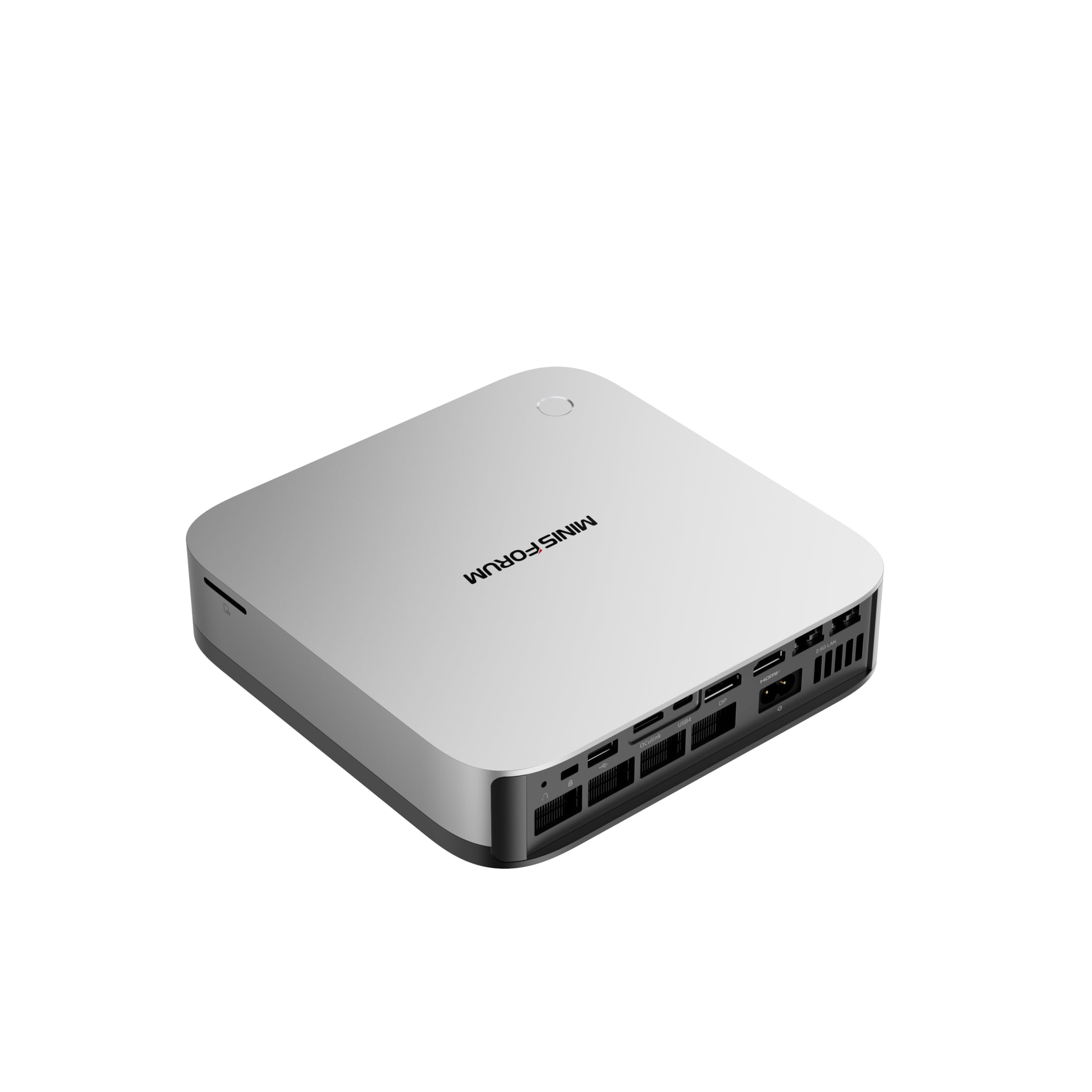

128GB RAM ceiling and OCuLink for a GPU upgrade later
- Max Memory
- 128 GB
- Memory Bandwidth
- 89.6 GB/s
- GPU/NPU
- 50 TOPS
- 128GB RAM: fits 70B quantized models
- OCuLink: add a desktop eGPU later
- 890M iGPU: slow tokens on large models
For $1,247 you get a mini PC that can be upgraded to 128GB of DDR5, enough to load a 70B model at Q4. Generation will be slow at that size, though, because the Ryzen AI 9 HX 370 feeds its Radeon 890M iGPU through ordinary dual-channel memory, not the wide bus of a Ryzen AI Max machine.
The MINISFORUM AI X1 Pro-370 is a mini PC you buy for what it lets you add later, not for peak local LLM speed. It ships with 32GB of DDR5-5600 and a 1TB SSD, and the RAM sits in removable SO-DIMM slots. Many mini PCs and laptops at this price solder their memory, which locks you into day-one capacity. Here you can move to 64GB or 128GB when a bigger model or a longer context window calls for it.
The ceiling is memory bandwidth. Dual-channel DDR5-5600 works out to about 89.6 GB/s (5,600 MT/s × 8 bytes × 2 channels). Token generation in llama.cpp, Ollama or LM Studio is mostly limited by how fast the weights can be read from memory, so that figure sets the speed limit. Ryzen AI Max (Strix Halo) machines run at roughly 256 GB/s, about three times faster. The HX 370's NPU and its TOPS rating do not change this.
The escape hatch
The OCuLink port is what makes the X1 Pro-370 worth considering over cheaper HX 370 boxes. It provides a closer-to-native PCIe link to an external desktop GPU than USB4 does. A card with its own VRAM bypasses the 89.6 GB/s limit for any model that fits inside that VRAM.
The dual USB4 ports cover docks and fast external storage, and are the fallback eGPU route on most rival mini PCs. Three PCIe 4.0 M.2 slots, supporting up to 12TB in total, mean model libraries won't crowd out your OS drive.
If you know today that 70B-class speed matters most, a Strix Halo machine is the more direct answer. If you want a capable machine now and the option to add RAM, storage or an eGPU later, this is where the X1 Pro-370 earns its price.
Design and build quality
The AI X1 Pro-370 is not the smallest HX 370 mini PC you can buy, and that is deliberate. MINISFORUM spent the extra volume on hardware that ultra-compact rivals usually push outside the box or leave out: an internal power supply, separate cooling zones and a built-in audio and login setup. If you are comparing it with palm-sized boxes, treat the larger footprint as the cost of those features rather than as wasted space.
One cable instead of a power brick
The biggest practical design choice is the built-in 135W power supply. Most mini PCs at this level ship with an external adapter roughly the size of a paperback that ends up on the floor or taped under the desk. Here, a single mains cable goes straight into the chassis, so the desk setup is the PC, the stand and one power lead, plus whatever display and USB cables you add.
The 135W rating also leaves headroom. MINISFORUM quotes a maximum system power draw of 65W, so the supply is not running near its limit even when the CPU, iGPU and three SSDs are all busy. The manufacturer says moving the adapter inside reduces the connection-related stability problems and coil noise that external bricks can cause. That claim is hard to verify, but the cable-management benefit is obvious. The trade-off is that the power supply's heat now stays in the chassis, which affects how the cooling is laid out.
The stand: upright or flat
A dedicated stand lets the X1 Pro-370 stand vertically or lie horizontally. That choice affects where the machine can go:
| Orientation | Footprint | Best fit |
|---|---|---|
| Upright in the stand | Smallest desk area, taller profile | Beside a monitor, crowded desks, shelves |
| Lying flat | Wider but lower | Under a monitor riser, inside a desk cubby, on top of a small eGPU enclosure |
Upright is the better choice if desk space is tight and you want front-panel ports within reach. Flat suits monitor-arm and under-desk setups where height is limited. That matters if you plan to add an OCuLink eGPU later, because the PC and the GPU enclosure need to sit close together.
Why the chassis is bigger: separate cooling zones
The cooling design explains most of the size. MINISFORUM fits separate fans for the CPU and for the SSDs, and adds heat-spreading for the RAM and the internal power supply. Many compact HX 370 boxes use one blower for everything and leave the M.2 drives to absorb leftover heat. That works for an office build with one SSD. It works less well when three PCIe 4.0 drives rated at up to 7,000 MB/s sit next to a 12-core CPU.
Fast PCIe 4.0 SSDs throttle when they get hot. That shows up during long jobs: copying model files, loading a large quantized model from disk, or indexing a big document set for RAG. With a dedicated SSD fan, filling all three M.2 slots is more practical than in chassis that leave the drives to share a single fan with the CPU.
The cost of this layout is a box noticeably larger than ultra-compact HX 370 rivals, with more than one fan that can spin up under load. Noise figures are covered later in this review. From a design standpoint, MINISFORUM prioritised sustained thermal headroom and room for upgrades over the smallest possible footprint, which suits a machine sold on 128GB RAM support and three SSD slots.
Built-in hardware for video calls
The chassis also includes hardware most mini PCs leave out:
- Fingerprint sensor: Windows Hello sign-in without a separate USB reader or a webcam with IR.
- Dual DMIC microphones: a noise-reducing array for calls, so a desk headset is optional for meetings.
- Built-in speakers: system sounds, call audio and casual playback work without external speakers.
Together, these mean a basic video-call setup needs only a webcam and a monitor. There is no camera in the box. For a home office, a shared reception desk or a meeting-room PC, that removes two or three peripherals and their cables. Small built-in speakers are not a replacement for proper desktop speakers or headphones for music or gaming. They are meant for calls and notifications.
Performance for local LLMs and gaming
The Ryzen AI 9 HX 370's 12 cores / 24 threads, boosting up to 5.1 GHz, give it more CPU headroom than most single-user desks need. Compiling a mid-sized codebase, running Docker containers, and keeping 40 browser tabs open are well within its range. More importantly, you can leave Ollama or LM Studio serving a model in the background while you keep working in the foreground. If you are coming from a 6- or 8-core laptop chip, the extra threads mostly show up as fewer stalls when several heavy apps compete at once.
Why bandwidth, not TOPS, sets your tok/s
The NPU's TOPS rating covers Windows features like Recall and live captions. It does almost nothing for llama.cpp-based tools generating text. Token generation is memory-bound: for every token, the system streams the model's weights out of RAM, so the theoretical ceiling is roughly memory bandwidth divided by model size. With dual-channel DDR5-5600 at about 89.6 GB/s, that arithmetic produces the estimates below. These are upper bounds, and real-world tok/s lands lower once overhead, context length and software efficiency are counted.
| Model (Q4 quantization) | Approx. weight size | Theoretical ceiling at ~89.6 GB/s | Practical feel |
|---|---|---|---|
| 7B–8B | ~4–5 GB | high teens tok/s | Comfortable for chat, coding help, RAG |
| 13B–14B | ~8–9 GB | ~10 tok/s | Usable, noticeably slower |
| 32B | ~18–20 GB | ~4–5 tok/s | Patient batch work, not live chat |
| 70B | ~40 GB | ~2 tok/s | Loads with 64GB+ RAM, but crawls |
The table shows the trade-off at the heart of this machine. With 128GB installed, a 70B Q4 model fits, but fitting is not the same as running quickly. At roughly 2 tok/s, you wait while a paragraph trickles out. The practical sweet spot is 7B–14B models with a generous context window, which suits agent prototyping and document Q&A. Prompt processing, the step that reads in your input, leans more on compute. Long pasted documents therefore take a beat to digest before generation starts.
More RAM lets you load bigger models. It does not make any model generate faster, because the 89.6 GB/s ceiling stays the same whether you install 32GB or 128GB. If your goal is fast 30B–70B inference, the bandwidth class of the machine matters more than how much RAM it can hold.
Radeon 890M: strong iGPU, realistic expectations
The Radeon 890M is one of the strongest integrated GPUs outside AMD's Strix Halo parts. Its 16 RDNA 3.5 compute units are clearly ahead of the 780M found in older Ryzen 7 8845HS/8945HS mini PCs. Minisforum's claim that it plays "AAA games with smooth, stunning graphics and zero latency" needs translating, though:
- Recent AAA titles: 1080p with low-to-medium presets, plus FSR upscaling or frame generation, for playable frame rates.
- Esports and older games: high settings at 1080p are realistic.
- Native high presets in demanding 2024–2026 releases: not realistic.
The iGPU also draws on the same ~89.6 GB/s pool that the CPU uses, so games and GPU-offloaded LLM layers compete for that bandwidth. If gaming quality matters to you, the OCuLink eGPU route covered later in this review is the real upgrade.
The 65W ceiling
MINISFORUM quotes a maximum power consumption of 65W, which is the budget the HX 370 and 890M share under sustained load. Long renders, extended gaming sessions or a model running flat-out will therefore settle below what the same chip can sustain in larger chassis with higher limits. Ryzen AI Max machines also run at substantially higher package power, on top of their wider memory bus. Expect a sensible sustained clock rather than a benchmark-chasing one.
Range across the products compared here
Among catalog rivals, the HX 370 places it in the upper tier of conventional mini PCs. It is faster in graphics and multi-threaded work than 8845HS/8945HS boxes, and roughly level with other HX 370 machines on raw silicon. It sits well below Strix Halo for LLM throughput. What sets it apart from same-chip rivals is not speed but what surrounds the chip: the RAM slots, the storage, and the OCuLink port.
| Max Memory | 128 GB |
|---|---|
| Memory Bandwidth | 89.6 GB/s |
| GPU/NPU | 50 TOPS |
Noise, power and day-to-day software
Acoustics are the main compromise in daily use. MINISFORUM quotes a full-load noise level of 45 dB. That is a manufacturer figure for sustained load, not an independent measurement, and on a quiet desk a fan at that level is generally audible from arm's length. You will notice it during a long llama.cpp generation run, a batch embedding job for a RAG index, or an evening of gaming on the Radeon 890M. Light office work and browsing should rarely push the fans that far. If the box sits under a monitor in a silent home office, though, expect a steady whoosh whenever a local LLM is generating.
The separate CPU and SSD fans help here. Heat from three M.2 drives does not have to be cleared by the same fan that is cooling a 12-core chip, so the CPU fan has less reason to ramp up during storage-heavy work like loading a 40GB model file.
Power draw: modest by desktop standards
The 65W ceiling has two practical consequences for a machine left running:
- Always-on duty is cheap to run. A box hosting Ollama as a local API endpoint for agents or a home RAG service draws far less at full load than even a mid-range desktop GPU alone.
- Heavy jobs stay inside that envelope. Because token generation is bound by memory bandwidth rather than wattage, the cap costs more in prompt processing and gaming than in tok/s.
Windows AI features vs. the tools you'll actually use for LLMs
The software split is worth understanding before you buy for "AI." The Ryzen AI 9 HX 370 includes an XDNA 2 NPU, which AMD rates at 50 TOPS. That rating clears the bar for Windows 11's Copilot+ features, and those features are what the NPU actually runs on this machine:
| Workload | Runs mainly on | Practical takeaway |
|---|---|---|
| Copilot key, Recall, live captions/translation | NPU (XDNA 2) | Low-power background AI that stays off the CPU and iGPU |
| Ollama, llama.cpp, LM Studio inference | CPU and/or Radeon 890M iGPU | Speed depends on memory bandwidth and iGPU offload, not TOPS |
| Video-call voice pickup | Dual DMIC array + software noise reduction | Usable for meetings without a headset |
The dedicated Copilot key opens the assistant, and Recall lets you search recent on-screen activity by describing it. Live captions can translate audio during calls or videos. The fingerprint sensor handles Windows Hello sign-in.
None of this speeds up your local LLM stack. Ollama and llama.cpp mostly ignore the NPU and run on the CPU cores or the iGPU. The "50 TOPS" figure tells you Windows AI features will work, not how fast a 14B model will answer. Recall also stores snapshots of your activity locally. Developers working with client code or credentials may want to review or disable it in Windows settings.
Pro tip: give the Radeon 890M more memory in the BIOS
The iGPU shares system RAM, and the BIOS reserves only a small slice for it by default. When a model plus its context window doesn't fit in that slice, llama.cpp-based tools may offload fewer layers to the iGPU or fall back to the CPU, and both cost speed.
Enter the BIOS (usually Delete at boot) and look for the iGPU memory setting. It is often labelled UMA Frame Buffer Size, though the name varies by BIOS version. Raise it to fit your target model. Leave enough for Windows and your apps:
- 32GB kit: a large reservation squeezes everything else. This config suits 7B–8B models at Q4.
- 64GB or 128GB kit: you can dedicate a much bigger share and still keep comfortable headroom for the OS. This is where the socketed RAM pays off.
After rebooting, confirm in your tool's log that the layers actually landed on the GPU before you judge tok/s.
Overall, this is a machine you hear under sustained load but barely notice on the power bill. Its NPU serves Windows features, while the CPU and iGPU do the actual local LLM work.
How it compares with Strix Halo and other mini PCs
| Product | Rating | Price | Buy |
|---|---|---|---|
 Apple Mac mini (M5 Pro) 307GB/s unified memory for running local LLMs from a five-inch desktop +307GB/s bandwidth: faster LLM token generation+GPU Neural Accelerators: quicker prompt processing -Fixed memory: choose LLM capacity upfront | $1,549.00 | Buy → | |
 Apple Mac Studio (M5 Max) Up to 128GB unified memory at 614GB/s for running large LLMs quietly on your desk +128GB unified memory fits large quantized LLMs+614GB/s bandwidth speeds token generation -128GB cap limits the largest models | $2,299.99 | Buy → | |
 AMD Ryzen AI Halo Editor's Choice 128GB unified memory to run up to 200B-parameter models locally on Linux +128GB shared pool: loads 200B models+Preloaded ROCm stack: less Linux setup -256 GB/s limits dense-model token speed | $4,760.00 | Buy → | |
| Apple Mac mini (M6) Best Value Up to 32GB unified memory and 170GB/s in a 5x5-inch box for quiet, always-on local LLMs +32GB unified memory fits ~30B quantized models+GPU Neural Accelerators speed prompt processing -170GB/s bandwidth limits tokens per second | $779.00 | Buy → | |
 GEEKOM A9 Max Ryzen AI 9 470 mini PC with room for 128 GB RAM to run larger local LLMs +128 GB RAM ceiling fits bigger models+2TB SSD stores many model files -Stock 32GB limits model size | $1,599.00 | Buy → | |
 MINISFORUM AI X1 Pro-370 128GB RAM ceiling and OCuLink for a GPU upgrade later +128GB RAM: fits 70B quantized models+OCuLink: add a desktop eGPU later -890M iGPU: slow tokens on large models | $1,247.00 | Buy → |
Prices as of Nov 12, 2026; they may have changed since.
Who it suits
The AI X1 Pro-370 is for buyers who value headroom over peak speed. Its strengths are socketed RAM up to 128GB, three PCIe 4.0 M.2 slots, OCuLink and four display outputs. Its main limit is roughly 89.6 GB/s of dual-channel DDR5 bandwidth. Whether it fits you depends on which of those matters more for your work.
Developers prototyping RAG and agents
If you build retrieval pipelines, tool-calling agents or coding assistants around 7B–14B models, this mini PC can run as a quiet, always-on Ollama or LM Studio server on your network. The 2.5GbE port suits that role.
As the performance table shows, an 8B model at Q4 has a theoretical ceiling in the high teens of tok/s, and a 14B model roughly halves that. Real-world speeds land lower but stay responsive enough for iterating on prompts, embeddings and agent loops.
The advantage over soldered-memory machines is the upgrade path. You can start at the shipped 32GB and move to 64GB or 128GB SO-DIMMs once you need:
- Longer context windows
- Several models loaded at once, such as an embedding model, a reranker and a chat model
- Q8 weights instead of Q4
The three SSD slots also let you keep model files, vector databases and your OS on separate drives.
Multi-monitor office and creative desks
Two USB4 ports, HDMI 2.1 and DP 2.0 drive up to four 4K displays from a box that stands upright or lies flat. That suits:
- Traders and analysts who want a four-screen layout without a tower under the desk
- Developers running an IDE, docs and dashboards side by side
- Photo editors who need a reference monitor plus a working display
The 2.5GbE port makes NAS-based photo or video libraries workable, and Wi-Fi 7 helps where you can't run cable. The built-in 135W supply means no power brick on the floor. The fingerprint sensor helps on shared office desks.
Buyers planning an eGPU later
If a dedicated GPU is likely in your future, OCuLink is the deciding feature. Use the Radeon 890M for light gaming and small models now, then add a desktop graphics card in an OCuLink dock for its own VRAM and much faster inference on any model that fits in it.
Who should look elsewhere
70B models at usable speed. The roughly 2 tok/s ceiling on a Q4 70B model is too slow for interactive chat. A Ryzen AI Max (Strix Halo) machine, with about three times the bandwidth, is the better buy if large-model speed is your goal.
Silence under load. The quoted 45 dB at full load is reasonable for a 65W-class system but audible in a recording space or a silent bedroom office during long inference or compile jobs. Idle and light-load use is a different story. If you need near-silence while the machine works hard, look at fanless or Apple Silicon options.
Browsing, streaming and email. At $1,247, you would be paying for expansion slots, OCuLink and a 12-core CPU you won't use. A budget mini PC with an older Ryzen or Intel N-series chip handles 4K streaming and office apps for a fraction of the price.
Good for
- Developers running Ollama or LM Studio as an always-on local LLM server for 7B–14B models in RAG and agent prototypes
- Users who expect to grow RAM from 32GB to 64GB or 128GB as models and context windows get larger
- Office, trading and creative setups that need four 4K displays plus 2.5GbE in a compact footprint
- Buyers who want to start with the Radeon 890M and add an OCuLink eGPU later
- Anyone who wants separate SSDs for the OS, model files and project data
Not for
- Anyone who needs fast tok/s on 70B models; Strix Halo's roughly 256 GB/s is the better match
- Recording studios or noise-sensitive rooms where a quoted 45 dB at full load is a problem
- Light users who only browse, stream and email, since cheaper mini PCs cover that
- Buyers who want high-end GPU gaming out of the box without budgeting for an eGPU
Value for money and verdict
At $1,247, the AI X1 Pro-370 doesn't win on raw speed. Its HX 370, Radeon 890M and dual-channel DDR5-5600 are shared by cheaper HX 370 mini PCs, so performance alone doesn't explain the price. What sets it apart is the hardware around the chip: socketed RAM up to 128GB, three PCIe 4.0 M.2 slots (up to 12TB), OCuLink plus dual USB4, and a built-in 135W power supply. You are mostly paying for expandability. Whether that is good value depends on whether you will use the upgrade paths.
| What the premium buys | Why it matters | Who benefits |
|---|---|---|
| Removable DDR5, up to 128GB | Lets you grow from 7B–14B models to 70B-class quantized models without replacing the machine | Local LLM users planning to scale |
| Three PCIe 4.0 M.2 slots | Room to keep a separate drive for model files, datasets and the OS | Developers with large model libraries |
| OCuLink port | A closer-to-native PCIe link to a desktop GPU than USB4 | Buyers who may add an eGPU later |
| Four 4K outputs, 2.5GbE, Wi-Fi 7 | Works as a workstation hub without docks | Office and creative multi-monitor setups |
Budget for the RAM you actually need
The retail configuration ships with 32GB. That covers 7B–14B models at Q4 or Q8 with a comfortable context window. It is not enough for 70B-class models.
If large-model capacity is the reason you're buying, add the cost of a 64GB or 128GB DDR5-5600 SO-DIMM kit to the $1,247. You may also be left with the original 32GB modules as spares. Compare that all-in total against the price of an entry-level Ryzen AI Max (Strix Halo) machine. If the totals come out close, Strix Halo's roughly 256 GB/s of unified memory bandwidth is the stronger deal for generation speed. The trade-off is that its memory is soldered and can't be upgraded later.
Where the money is well spent, and where it isn't
The price makes sense if you'll use at least two of the expansion features. Examples include a developer who starts at 32GB for RAG and agent prototyping and moves to 128GB later, or a gamer who plans to add a desktop GPU over OCuLink once budget allows. In both cases the machine grows with you instead of being replaced. Soldered-memory machines like Strix Halo boxes and Apple Silicon Mac minis can't offer that.
The price makes less sense for two kinds of buyer:
- Fast generation on 30B–70B models is the priority. Bandwidth-rich options such as Strix Halo, or a Mac mini running MLX at its RAM tier, get more tok/s per dollar on those workloads.
- You will never open the case or connect an eGPU. A cheaper HX 370 or Ryzen 8945HS mini PC delivers similar everyday performance for less, with fewer slots and ports.
Pros
- Socketed DDR5 up to 128GB, so you can start at 32GB and upgrade later
- Three PCIe 4.0 M.2 slots and up to 12TB of storage
- OCuLink and dual USB4 give a real eGPU upgrade path
- Built-in 135W PSU, four 4K outputs, 2.5GbE and Wi-Fi 7
Cons
- Dual-channel DDR5 (about 89.6 GB/s) limits tok/s on large models
- A 64GB or 128GB upgrade adds noticeably to the $1,247 starting price
- Strix Halo outruns it on big-model generation if your total budget stretches that far
The final call
The AI X1 Pro-370 is a strong, flexible all-rounder and a sensible local LLM starter box. It handles 7B–14B models well today, can fit far larger models after a RAM upgrade, and can take a desktop GPU over OCuLink when you want more graphics performance. If generation speed on big models is your top priority, it is the wrong buy. In that case, put the money toward Strix Halo-class bandwidth instead.
A well-equipped, upgradeable mini PC whose $1,247 price pays for RAM, storage and OCuLink headroom rather than speed. Buy it to grow into larger local LLMs and an eGPU, and skip it if fast tok/s on 70B-class models is the goal.